Introduction to Preprocessing for Machine Learning
Hi, I’m Neetika — a Technical Content Writer with 3+ years of experience crafting developer-focused blogs on Java, DSA, Machine Learning, AI, and Web Development. I love simplifying complex concepts into beginner-friendly, SEO-optimized content that educates, inspires, and ranks. I’ve written for top tech platforms like GeeksforGeeks, Medium, and Tutorialspoint. Whether it's a deep-dive tutorial, hands-on coding guide, or interview-focused content — I aim to make learning enjoyable and practical.
Your data needs to be suited to your model !!
Before performing any preprocessing in data, you first need to know about your data. For this, we have some useful attributes like .columns, .dtype, .describe().
.column: generate a list of features.
.dtype: tells about the datatype of each feature.
.describe(): tells about the basic statistics of your data like mean, std, min, max.
Dataset may contain missing values, incompatible datatypes etc. that needs to be taken care.
Removing missing values
Let there be a dataframe ‘df’ for a dataset.
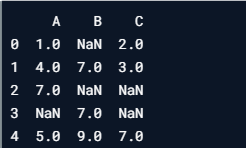
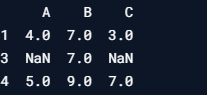
To drop all row that contain missing values use dropna(). Eg: df.dropna().
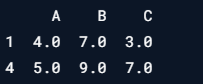
To drop specific rows, pass index labels to drop function. Eg: df.drop([1,2,3]).
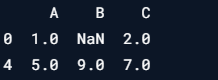
To drop a column (let column name be A) with missing values, use df.drop(“A”,axis=1)).
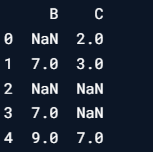
To count null values in column use df[“B”].isnull().sum().

To count non-null values use, df[df[“B”].notnull()])
Working with datatypes
The basics data types present in a dataset are:
object: string/mixed type
int64: integer
float64: floating values
Sometimes, there is a need to change datatypes of certain features. To do so, use, df[“col_name”] = df[“col_name”].astype(“data_type_name”)
Eg: If you wish to convert a column named “A” datatype from integer to float.
df[“A”] = df[“A”].astype(“float64”)
Training and Tests sets
One of the necessary steps of preprocessing should be splitting of the dataset, to avoid overfitting. If a model is trained on the entire training set, there will be no data left to test that model and the model will know all the data by heart. Having a test set enables a model to test itself on unseen data. Splitting can be done as follows:
from sklearn.model_selection import train_test_split
train_X, test_X, train_y, test_y = train_test_split(X, y)
By default, data is splitted in 75% training set and 25% test set. To customize the splitting according to the need, use, test_size parameter, for eg: test_size = 0.3 will split the dataset in 70% training set and 30% test set.
Somtimes the splitting can be biased and this could bias the model, for eg: training set may contain same labels throughout the set and it ask model to test for the label that the model has never seen. This means there is a presence of imbalance classes. So, a good technique to handle these imbalanced classes is stratified sampling. It takes into account the distribution of classes in the dataset.
For example, if we have a dataset with 1000 samples, 800 of class A and 200 of class B. We want 80% of class A and 20% of class B for each set. Below is the distribution that we want,
Training set: 750 samples, 600 of class A and 150 of class B.
Testing set: 250 samples, 200 of class A and 50 of class B.
y[“labels”].value_counts()
The above piece of code will output:
Class A 800
Class B 200
To achieve uniform distribution, set stratify = y in train_test_split
train_X, test_X, train_y, test_y = train_test_split(X, y, stratify=y)
train_y[“labels”].value_counts()
The above piece of code will output:
Class A 600
Class B 150
test_y[“labels”].value_counts()
The above piece of code will output:
Class A 200
Class B 50
It can be seen that the distribution of classes is in accordance with the original y class distribution

